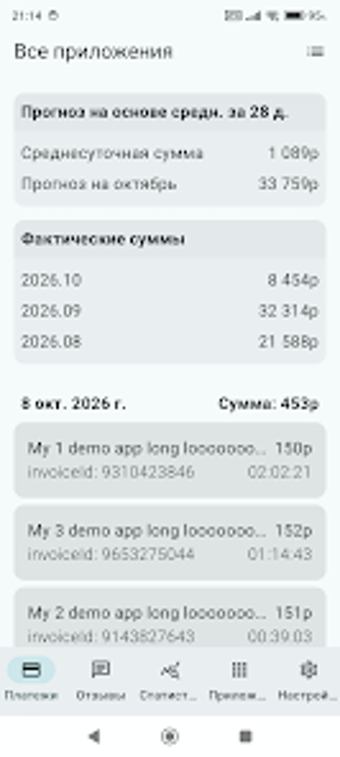
Mobile console for managing RuStore apps on Android
Shows dashboard metrics, moderation status, review threads, and per-app install trends in a single Android interface, giving on-the-go control of published listings. Developed by WasiliySoft for the business-productivity category, it brings RuStore developer functions to mobile. The app suits independent developers and corporate publishers who need to monitor installs, reply to reviews, and check moderation without a desktop, offering lightweight access to essential console data and notifications.
What the tool does for RuStore publishers
The app provides mobile-native access to core developer data, presenting a dashboard with application metrics and performance data so publishers can track downloads, active installs, and ratings. It shows moderation and publication status in real time and supports multiple applications under one developer account. These capabilities let a publisher see lifecycle signals and account-level overview from a phone rather than opening the web console.
How daily developer workflows play out on the app
Review handling and quick responses sit at the centre of daily use. The integrated review management system lists user feedback and lets the developer post replies, which supports ongoing engagement. Detailed statistics per application present installation and uninstallation trends that a publisher can scan to spot sudden drops. Managing several apps occurs within the same account view, so switching between titles does not require repeated logins.
Interface, onboarding, and required knowledge
The interface is lightweight and tuned for mobile speed, designed to present data rapidly on standard Android devices. It requires an active RuStore developer account and uses API key or official authentication methods to link accounts. The app's focus on data visibility reduces menu depth, which helps independent developers start using it without extensive training, while corporate publishers can rely on familiar console concepts transferred to a phone layout.
Compatibility, integrations, and reliability considerations
The app connects to RuStore via official authentication paths and supports multi-app accounts, enabling in-place monitoring and management. Because it mirrors developer console functions like status updates and metrics, it fits into existing RuStore publishing workflows. The mobile client is presented as an unofficial third-party tool by WasiliySoft, so organizations should treat it as an auxiliary management channel that complements the web console rather than replacing it.
Who should use this app and when
Developers targeting the RuStore ecosystem gain a practical mobile way to monitor app health and handle user feedback when away from a desk. The app suits solo developers and publisher teams needing immediate visibility and reply capability; organizations that require formal audit trails or deep console-only operations should keep the official web console as their primary control point.